I wanted to share some information regarding the HuskyLens and the SparkFun XRP robot. From my experience, the HuskyLens can work with the XRP, but the official drivers and instructions currently available do not work out-of-the-box. Getting it running often requires some knowledge of coding and tweaking the driver files.
To help with this, I’ve put together a GitHub repository with a rough working version of the drivers and example code here. While it’s functional, it’s still a bit rough around the edges.
I’d love to see better solutions or updates—either improvements to my repository or updates to the official XRP HuskyLens drivers/instructions—to make it easier for other users and educators to get the HuskyLens working without extra troubleshooting.
Any feedback, contributions, or suggestions would be really appreciated!
For more details or inquiries, please refer to the GitHub repository.
If you have questions that aren’t answered there, feel free to reply to this post—I’ll do my best to check and respond as often as I can.
Could you please elaborate on what problems you encountered with the official SparkFun drivers? I looked at the changes in your repo, and the only functional difference I can find is changing the default I2C driver:
The qwiic_i2c driver has some magic code that’s designed to pick the default I2C bus for whatever board is in use:
If you were having trouble with the default I2C bus selection, there’s a couple possible reasons for that. But also curious to know if you were having any other trouble, since I can’t find any other functional differences.
Hi, thanks for your response, so the issue me and my class were faceing was when trying to use the drivers, they would not work, after a bit I figured out that the first issue is with the import at the top, so I renamed those to match, I can’t remember but I think I also changed a class later on in the code to work, but that didn’t solve this and since I’m very new to this it took me a bit to figure out, so when it calls the i2c driver, it puts it as none which now I don’t know why it’s originally like that but though testing I found that changeling it to (Id=1 sda=4 scl=5) (I’m doing this by memorie so bare with me) but that fixed it, those pin changes were in the actual husky lens driver part and not in the qwii i2c driver folder, but the issue with those is the miss named imports, if you have anymore questions I’ll answer them as quickly as possible but due to thanksgiving break there might be a slight delay.
so we followed the steps laid out in here Huskylens blocly - #2 by Fgrossman from one of your reply’s, the issue is from line 36 in micropython_i2c.py which is from .i2c_driver import I2CDriver which dose not match the name so i changed that to from qwiic_i2c.i2c_driver import I2CDriver as otherwise it errors before as the i2c_driver isn’t in lib and in a sub folder. i also changed in the _init_.py the import from .i2c_driver import I2CDriver to from qwiic_i2c import i2c_driver. and then that’s it except for the pin, whilst renaming the rest showed less and less errors i kept getting the none is not attributable error and the way i fixed that is by manually setting the pin, i would love to hear from ya if my somewhat fix breaks a different part of the code that dose that automatically, as I’m very new and it took me a bit to make this somewhat work for my classmates
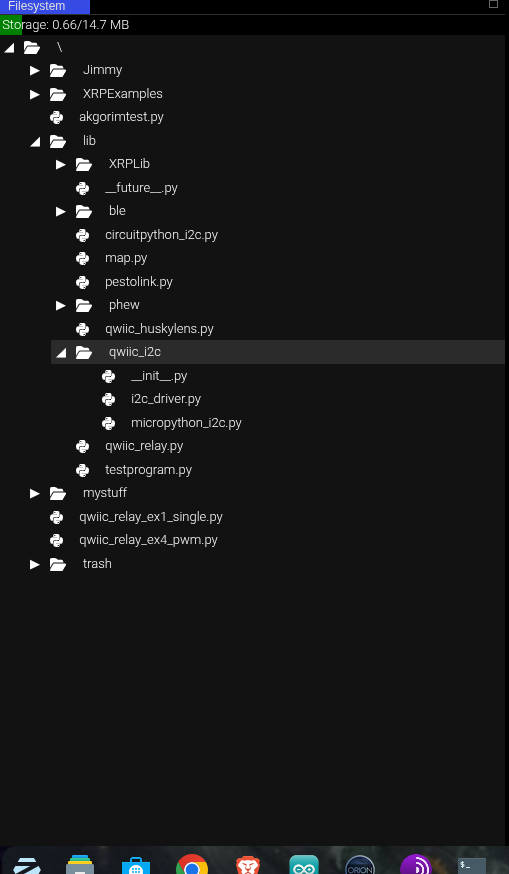
Could you please post the exact error message you’re getting? And could you also take a screenshot of your filesystem structure? Here’s mine for reference:
heres a screenshot of my file system with the fixed files, im working on sending the exact error message but first im backing up my files so i can switch to the code that errored out
With this change the ex1_basic_readings.py program works for me. The I2C() magic detection trick did not work for me. Without the change I get the following error:
‘id’ argument required
error: failed to connect to i2c bus
Perhaps the I2C() magic works in a more recent release?
Hi there! Apologies for my delay, I got very caught up in some other work for a couple weeks!
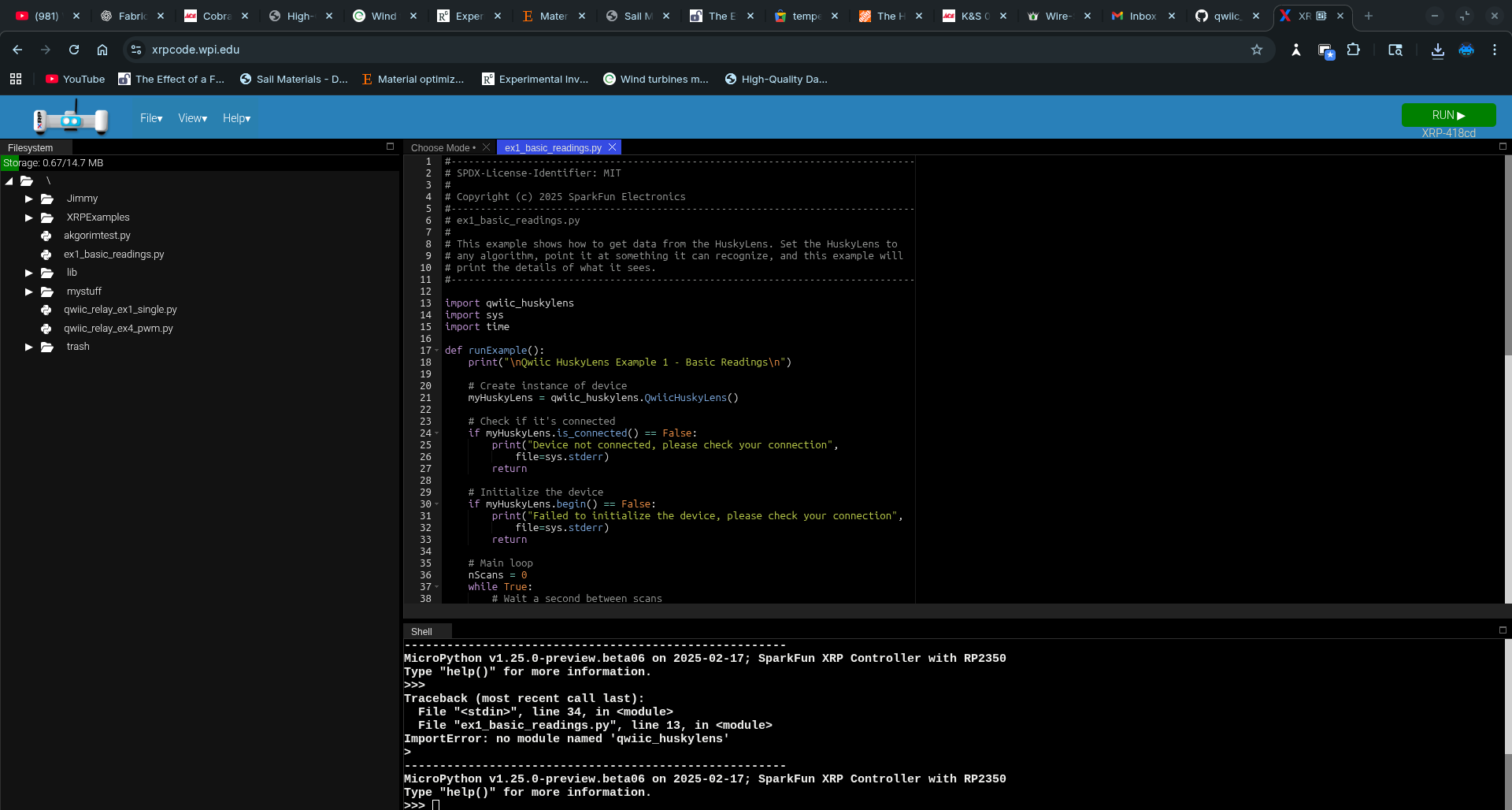
I would need a screenshot of your filesystem when it’s giving these error messages (your previous post was your filesystem after your fixes, correct?). no module named 'qwiic_huskylens' indicates that qwiic_huskylens.py is not in any location specified by sys.path:
Do you mean you’re running an __init__.py file? Which one?
Regardless, you’re not supposed to run __init__.py files by themselves as the main program in Python. They are only used when importing Python packages. In the case of the qwiic_i2c package, when you call import qwiic_i2c, the Python interpreter will automatically run the code in qwiic_i2c/__init__.py. It then runs this line:
The . in from .i2c_driver indicates a relative import, so the Python interpreter then looks for the I2CDriver class in qwiic_i2c/i2c_driver.py. Relative imports only work when that line of code is itself within a Python package. There’s a lot more resources about this.
So the only way to test if an __init__.py is working is to import the Python package.
These problems are (most likely) caused by running an old MicroPython version. Our qwiic_i2c package leverages a new MicroPython feature where it can automatically select the default I2C port and pins for each board. Unfortunately, XRPCode is currently only offering an old beta v1.25 MicroPython build, which I guess is before this feature was implemented. You can manually update your MicroPython version by downloading the latest (v1.27.0 as of writing) from the official MicroPython downloads page.
So, throughout these screenshots, the structure did not change; the only changes were in the code. When the libraries are called, they use the wrong location from the code. I never changed the names or locations of the actual files, and I tried updating my XRP, but my XRP is on the most recent version with the same issues, and so are about five other robots I have tested this on. I know the code isn’t meant to run on its own. Still, it’s a debugging step I use to see what issues there are, as when running the code by itself, you can get errors that you can’t get by running the main, which makes other parts of the code break, so I can fix those first, then get to the main code to speed up the process.
The error message no module named qwiic_huskylens means the file qwiic_huskylens.py was not found. When an import is performed, the Python interpreter looks in every directory specified by sys.path, which includes 3 different directories:
If the package is not found in any of those places, then that error is raised, so the only conclusion I can come to is that qwiic_huskylens.py was not actually saved to the XRP filesystem when you received the error no module named qwiic_huskylens. Sometimes when files are uploaded to the XRP, a full reset needs to occur for files to be importable. It’s also maybe possible that XRPCode didn’t fully upload or save the file. I don’t know why for certain, but if you got that error message, it means the file wasn’t there.
Those additional errors are because you’re running it as the main code, when it’s not meant to be run as the main code. Not because some errors are “hidden” when it’s imported. If there’s a problem when the code is imported, then an error will be raised.
I’m also curious to know what happens if you undo your changes to qwiic_i2c/__init__.py and qwiic_i2c/micropython_i2c.py (lines 66 and 36 respectively, change them back to the relative imports from the official SparkFun qwiic_i2c package), then run the example code again. Do you get errors, or does it work? If it works after that change, then that means the relative imports are fine, and the only problem is running qwiic_i2c/__init__.py as the main program (which you shouldn’t be doing anyways, so errors in this case are not a real problem).
According to your screenshots, your XRP is on version v1.25.0-preview.beta06. The latest version is v1.27.0, released 2 weeks ago (December 9, 2025): https://github.com/micropython/micropython/releases/tag/v1.27.0 XRPCode is just pushing an outdated version. If you update to v1.27.0, then you should no longer have the id argument required error. Note that updating the firmware may wipe your filesystem, so back up important files first.